
TikTok Video Dimensions and Format Guide (2026)
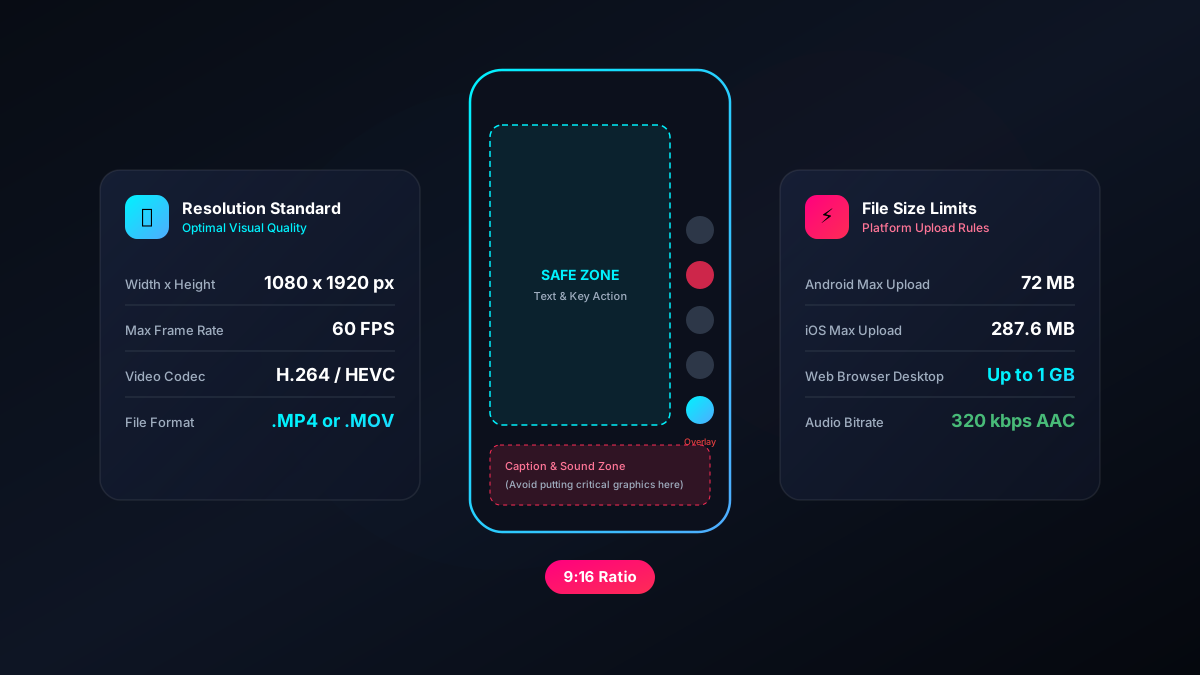
Nothing kills a great video faster than aggressive compression artifacts or important text being covered by the TikTok UI. If you are editing outside the app (in Premiere Pro, CapCut PC, or Final Cut), getting your export settings right is critical. Here are the exact technical specifications you need.
The Golden Rules: Resolution and Aspect Ratio
TikTok is built for modern smartphone screens. If you deviate from the standard vertical format, the app will either crop your video or add black bars (letterboxing) to the top and bottom, which immediately makes the content look unoptimized and reduces engagement.
- Aspect Ratio: 9:16 (Vertical)
- Resolution: 1080 x 1920 pixels
Should you export in 4K? No. While modern phones shoot in 4K (2160 x 3840), TikTok caps playback resolution at 1080p. If you upload a massive 4K file, TikTok's servers will downscale and compress it aggressively to save bandwidth. This server-side compression is often brutal, resulting in a blurry, pixelated video. Exporting exactly at 1080 x 1920 ensures you control the downscaling quality, not TikTok.
TikTok Safe Zones (Don't cover your text!)
One of the most common mistakes creators make is putting text or faces too close to the edges of the frame. The TikTok interface (the like/comment buttons on the right, the caption at the bottom, and the "Following/For You" tabs at the top) overlays your video.
If your text is underneath these elements, viewers cannot read it. Here are the safe zones you must respect:
- Top Margin: Keep the top 15% of the screen clear of text (for the top navigation bar).
- Bottom Margin: Keep the bottom 20% clear. This is crucial—this is where your caption, hashtags, and the music ticker live. If you write long captions, this UI element expands upward.
- Right Margin: Keep the right 15% clear to avoid the profile picture, like, comment, bookmark, and share buttons.
Pro Tip: Download a "TikTok Safe Zone Template PNG" and overlay it on your video editor's timeline. Turn its opacity to 50% while placing your text, then hide it before exporting.
Optimal Export Settings (Premiere Pro / Final Cut)
To avoid the dreaded TikTok compression blur, use these exact export settings in your Non-Linear Editor (NLE):
| Setting | Value |
|---|---|
| Format | H.264 (.mp4) or H.265 (HEVC) |
| Resolution | 1080 x 1920 |
| Frame Rate | 30fps or 60fps (match your source footage) |
| Bitrate Encoding | VBR, 1 Pass or 2 Pass |
| Target Bitrate | 8 Mbps |
| Maximum Bitrate | 12 Mbps |
| Audio Format | AAC, 48000 Hz, Stereo, 320 kbps |
Why 8 Mbps? TikTok file limits for Android are 72MB, and 287MB for iOS. However, even if your file is under the limit, a bitrate that is too high (like 30 Mbps) will trigger TikTok's heavy compression algorithm. 8 Mbps is the sweet spot where the file is small enough to bypass heavy server compression, but high enough to look crisp.
Turning on High-Quality Uploads
Even if you follow all the export rules perfectly, TikTok might still ruin your video if you have a specific setting toggled off in the app.
Before you tap "Post", scroll down to the bottom of the posting screen and tap More options. Ensure the toggle for Allow high-quality uploads is switched ON. If this is off, TikTok will compress your video heavily to save your mobile data.
Try the downloader
Save any public TikTok in HD without the watermark, or pull the audio as an MP3.
Open the downloader