
TikTok Analytics Explained
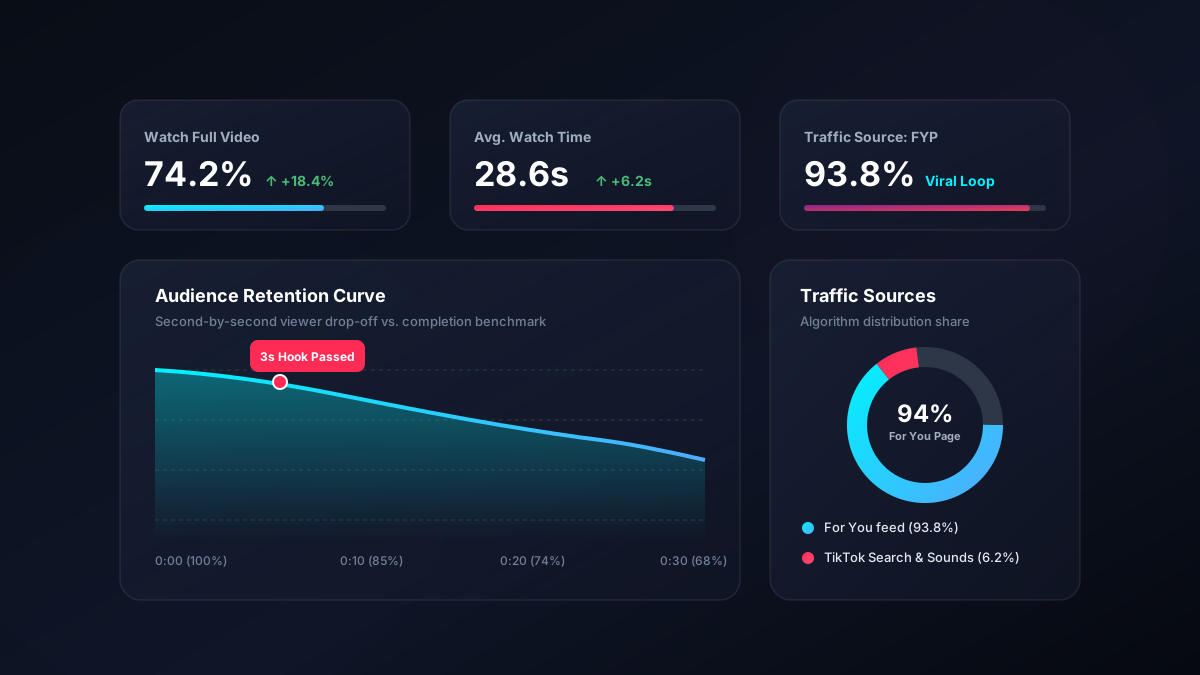
Most creators check their view count and stop there, which is roughly like judging a restaurant by how many people walked past. The useful numbers are one level down, and one of them — the retention graph — will tell you exactly which second your video lost people. Here is how to read the whole panel and what to change based on each number.
Turning analytics on
You need a Creator or Business account. Switching is free and takes seconds: Settings and privacy → Account → Switch to Business Account (or Creator).
Analytics then live under Profile → Menu (☰) → Creator Tools → Analytics. Data starts accumulating from the moment you switch — it is not backfilled — so switch early even if you are not ready to use it.
The single most useful screen
Open any individual video and find its retention graph — the line showing what percentage of viewers were still watching at each second.
This one chart diagnoses almost every problem. Four shapes cover nearly everything:
| Shape | What it means | What to change |
|---|---|---|
| Cliff in the first 1–2 seconds | The hook failed | Open on the payoff; cut title cards and intros |
| Steady decline throughout | Pacing is slow but nothing is broken | Cut 20–30% of the runtime; tighten the middle |
| Sudden drop partway through | Something specific lost them | Watch that exact second — usually a tangent or a pause |
| Flat, holds to the end | The video is working | Make more like this, and consider going longer |
If you take one habit from this article: after every video, open the retention graph and find the biggest drop. That is your note for next time.
Completion rate
The percentage of viewers who reached the end. This is the metric most closely tied to how widely your video gets distributed, because it is the clearest evidence that the video held attention.
Rough benchmarks, which vary by niche and length:
- Over 100% — people are rewatching. Excellent, and typical of short looping videos.
- 70–100% — strong.
- 40–70% — respectable, particularly for longer videos.
- Under 30% — the video is too long for what it delivers, or the opening oversold it.
The fastest way to raise completion rate is almost always to make the video shorter. Length should be earned by content, not padded to reach a target.
Watch time vs average watch time
Total watch time is the combined hours everyone spent. It mostly tracks view count and is not very diagnostic on its own.
Average watch time is how long a typical viewer stayed, and it is far more useful. Compare it against your video's duration: eight seconds on a fifteen-second video is healthy; eight seconds on a ninety-second video means almost nobody got past the opening.
Traffic sources
Where your views came from. This tells you what kind of success you are having.
- For You — algorithmic distribution. For a growing account this should dominate, typically 70–95%. A low share means the system is not confident about who to show your work to, which usually means the subject is drifting.
- Following — existing followers. A high share with low For You means you are preaching to the converted and not reaching new people.
- Search — people who searched a term and found you. This is quietly the most valuable source, because it continues for months. If a video has a meaningful search share, make more on that topic and put the search terms in your caption and on-screen text.
- Personal profile — people who visited your profile and worked through your videos. A good sign that your account, not just one video, is interesting.
- Sound — people who tapped through from an audio page.
Engagement metrics, in order of usefulness
Shares are the most meaningful. Sharing costs social capital — people only send things they are willing to vouch for. High shares relative to views means you made something genuinely useful or genuinely relatable.
Saves mean "I want this later". They are the strongest indicator for tutorials, recipes, lists and reference content. A high save rate is a clear instruction to make more of that.
Comments indicate the video provoked a response. Read them for content ideas — the question asked five times in your comments is your next video, and replying with a video gives you a pre-validated hook.
Likes are the weakest signal. Cheap to give, given reflexively, and mostly a by-product of the others. Do not optimise for them.
A rough engagement rate — (likes + comments + shares) ÷ views — around 5% or above is healthy on TikTok, which runs considerably higher than most platforms.
The Followers tab
Follower activity shows when your audience is on the app, by hour and by day. Use it to choose posting times — though as our timing guide explains, the effect is real but smaller than most people assume.
Territories shows where your followers are. Worth checking if your content is location-specific, or if you have accidentally built an audience in a different time zone from the one you are posting for.
Net followers is more honest than total followers. Losing people after a particular video is useful information: often it means that video pulled a general audience who then found your normal content irrelevant.
Numbers that are worth less than they look
- Total follower count. A vanity figure. Distribution is per-video, and 10,000 uninterested followers are worth less than 1,000 engaged ones.
- Profile views. Nice, weakly actionable.
- Video views alone. Without retention, views tell you what happened but not why.
- One video's performance. Variance on TikTok is enormous. Patterns across ten videos mean something; a single result means almost nothing.
A weekly review that takes ten minutes
- Sort the week's videos by views. Open the best and the worst.
- Compare their retention graphs. Where exactly did the worst one lose people?
- Check the traffic sources on your best video. If search was significant, note the topic.
- Look at shares and saves rather than likes. What did people find worth keeping?
- Write down one change for next week. One — not a list.
Doing this consistently is worth more than any amount of reading about the algorithm, because it is measuring your audience rather than someone else's.
Keeping your own records
TikTok's analytics have a limited time window, and the app's export options are not generous. If you care about long-term trends — or you need performance figures for a brand pitch — keep your own simple spreadsheet: date, topic, format, length, views, completion rate, shares.
Thirty rows of that will show you patterns the in-app view never will, and it is the evidence brands ask for when you approach them. The monetisation thresholds those pitches build on are set out in how to make money on TikTok.
Archive your best performers
Save clean copies of your top videos for pitches and portfolios.
Open the downloader